
Help Center
How to use ListingMind.
Tell us what you're trying to do, and we'll show you exactly where to start.
"I'm looking for a profitable product to sell online."
Explore product opportunities by marketplace and category. Runs in your browser — no install required.
Start here"I want to analyze my product for optimal visibility."
Install ListingMind, open a product page on a supported marketplace, then run Listing Analysis.
Start here"I want to compare product selling prices."
Install ListingMind, open a product page, then click Check Similar Product Pricing.
Start here"I want to know if demand is rising or falling before I commit."
Search any product or category to see its demand trend and lifecycle signals. Runs in your browser — no install required.
Start hereStep 1
Install the ListingMind extension
Choose the right install path on the ListingMind install page.
- Most users should install from the Chrome Web Store — Edge supports it directly, with a one-time "Allow extensions from other stores" prompt on first install.
- You can also download the ZIP from the install page and install it manually.
- Extract the ZIP, open
chrome://extensionsoredge://extensions, enable Developer mode, and choose Load unpacked.
Manual installs do not auto-update. Chrome Web Store installs update automatically.
Step 2 · Right after install
Pin ListingMind so it's always one click away
Chrome hides newly installed extensions behind the puzzle-piece icon by default. Pin ListingMind once and it stays visible in your toolbar from then on.
- Click the puzzle-piece icon (Extensions) at the top right of Chrome, next to the address bar.
- Find ListingMind in the list and click the pin icon next to it.
- The ListingMind icon now stays in your toolbar — click it any time you're on a product page.
 ListingMind
Watch ListingMind in action
Analyze a product listing in about one minute
This short visual walkthrough shows the basic flow: open a product page, confirm ListingMind detected it, run Listing Analysis, review the report, check similar products, and reopen saved work from your profile.
 Play demo
Step 3
Run Listing Analysis on a product page
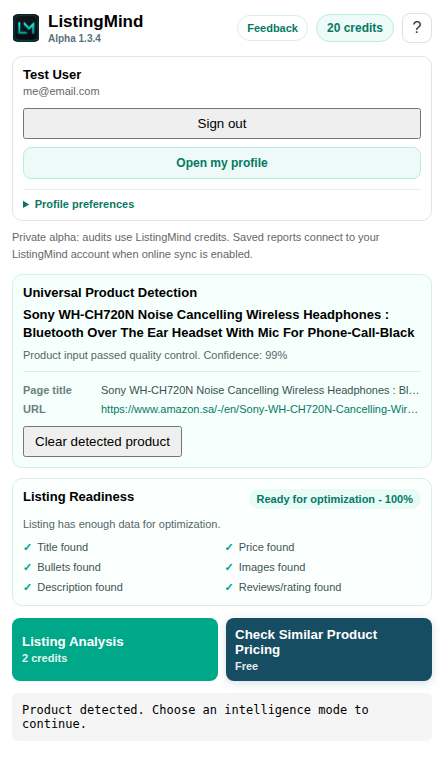
Open a marketplace listing. ListingMind detects the product automatically and shows it in the popup, along with a Listing Readiness check for what it found (title, price, images, description). Click Listing Analysis to extract visible listing facts, check image quality, review keywords, and build a seller action plan.
If detection is weak, ListingMind shows the page title and URL so you can review it, and lets you enter the product manually instead.
Alternative to Listing Analysis
Use Check Similar Product Pricing when you want more context
Open a product page, then click Check Similar Product Pricing directly in the popup — you don't need to run Listing Analysis first. Don't have a product page open? Use manual entry mode from the popup to open a blank report and type what you're looking for instead.
Pick which marketplaces to search from the checklist, then click Find products with ListingMind for structured results (price, rating, and review data included), or use Search on other marketplaces to continue research directly on a single marketplace. Neither method changes the listing score or recommendations.
Results from every marketplace you checked show up in one table. Use Show prices in to convert every result into a single currency for an apples-to-apples comparison, and sort or filter by marketplace to narrow a long list down.
Use Save report to keep a search — reopening it later shows the exact prices and exchange rate you saved, not today's rate.
No install needed
Use Market Opportunity Explorer for product research
Choose a marketplace and product area. ListingMind shows a sortable opportunity table with activity, competition, sellers, offers, price, estimated fees, and evidence quality.
Follow the three steps shown on the page: choose a market, select an opportunity, then estimate cost. The Alibaba supplier-price link sits beside the product-cost field where it is needed.
Save useful work to My Reports so you can reopen the same evidence without running another provider request.
No install needed
Use Trend Explorer to check demand before you commit
Search any product or keyword, or start from a category, to see its demand trend over time. ListingMind shows lifecycle signals (rising, seasonal, falling, or matured), next-gen alternatives, a sub-category breakdown, and AI-suggested search angles to explore next — powered by Google Trends.
Save useful work to My Reports so you can reopen the same evidence without generating a new report.
Coverage
Supported marketplaces
Listing Analysis is approved for these marketplaces today:
If ListingMind isn't confident it correctly detected a product on one of these marketplaces, Listing Analysis stays off rather than risk an inaccurate report -- we'd rather say no than guess. We're adding marketplaces regularly, so check back soon.
Check Similar Product Pricing and direct marketplace search also work on these marketplaces:
ListingMind-hosted search results (with price, rating, and review data) are available for Amazon and eBay.
Saved Work
Use My Account as your report hub
Open your Dashboard to review credits and saved reports. A reopened report uses its saved data and does not repeat AI or provider work.
- Use Save report on reports that provide a save action.
- Use Download PDF when you need an offline copy.
- Use Copy report link only on the same device.
Reading Reports
Understand what ListingMind is telling you
The report separates verified listing facts from AI-generated ideas. Use the Listing Enhancement Review table as your main action list.
- Product identity shows what ListingMind detected.
- Listing health score summarizes content and image quality.
- Listing Enhancement Review shows recommended actions.
- Keyword Opportunities shows safe search terms without ranking claims.
Evidence Boundaries
ListingMind keeps evidence and authority separate
Search results, discovered products, and AI ideas are helpful inputs, but they are not automatically treated as verified authority. ListingMind avoids unsupported ranking, sales, pricing, or competitor claims unless evidence supports them.
Account Control
Delete your ListingMind account
Open My Account, scroll to the Danger Zone under Settings, type the displayed confirmation phrase, and choose Delete account permanently. This removes the account, credits, saved reports, and payment history. Submitted feedback is anonymized.
For help with access or deletion, contact support@listingmind.io.